YouTube
Schedule YouTube videos with a title and a cover
Upload a video once, set its title, description, visibility and cover, and Posto publishes it on time, posts the first comment, brings the comments into one list and counts views and watch time.
Why Posto for YouTube
What a plain upload won’t do for you
-
A title from the first line
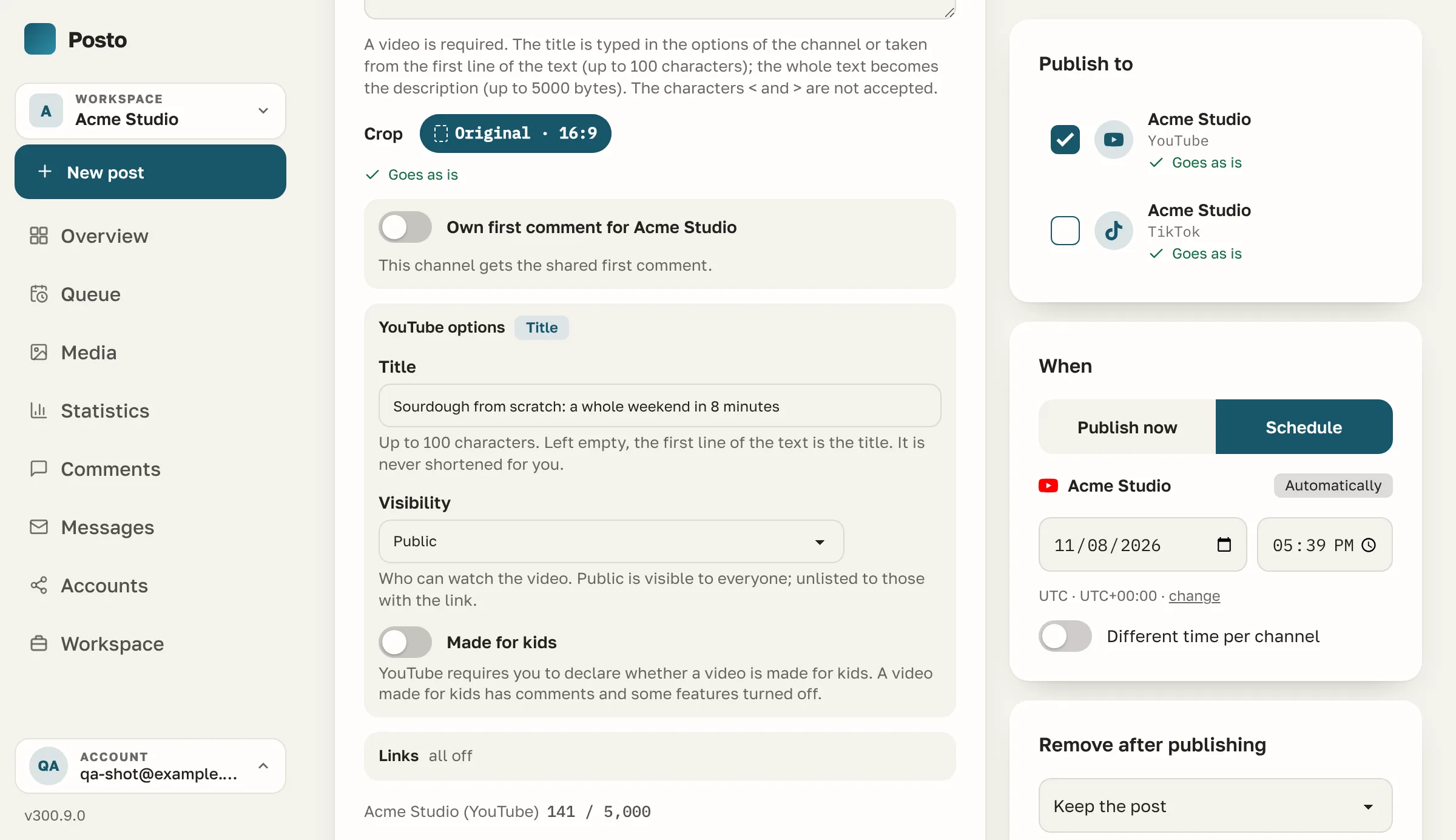
Leave the title empty and the first line of the text becomes it. Nothing is cut silently.
-
Your own cover
Pick a frame or upload a picture. If YouTube refuses the cover, the video still goes out and the queue says why.
-
The first comment, on time
Links or chapters go into the first comment, posted right after the video.
-
Comments next to your other networks
Reply to YouTube comments in the same list as Instagram, Facebook, Telegram and the rest, with auto-replies.
-
Waits out the daily limit
When YouTube’s daily upload quota runs out, the video waits for the reset and the upload carries on where it stopped.
-
Watch time, not just views
Average watch time, percentage viewed and shares of each video, next to views, likes and comments.
Everything, by group
Everything Posto does with YouTube
-
Publishing
- Videos in MP4 or MOV; a copy YouTube takes is made when needed
- Visibility: public, unlisted or privateThe default visibility and “made for kids” are settings of the channel, changeable for any video.
- “Made for kids”, declared with every video
- Your own cover, set right after the upload
- First comment right after the video is published
- Videos made by the AI marketer are labelled as synthetic content
- Delete a published video from Posto
-
Composer
- Title up to 100 characters, or the first line of the text
- Description counted in bytes, the way YouTube counts it
- Nothing is cut silently: a long or empty title and < or > in the text are flagged before scheduling
- Own text for YouTube, shared text for the rest
- Video: trim, a cover frame or your own cover
-
Conversations
- Comments under every video in one list, with replies
- Hide a comment and show it again
- Auto-replies and stop-word moderation
-
Statistics
- Views, likes and comments of each video
- Average watch time, percentage viewed, total watch time and shares
- Subscribers over time; a hidden count is shown as hidden
- Compare with other public channels
- What works for them: Shorts against longer videos
-
Connecting
- A YouTube channel or brand account, chosen in Google’s window — one connection per channel
- Disconnecting revokes Posto’s access at Google too
- Posto asks only for what these features need the permissions, one by one
YouTube at a glance
YouTube’s limits, checked as you write
The composer checks every post against these numbers before it is scheduled. They are read from the code on every page view, so this table is never out of date.
- Text
- 5,000 bytes
- Video
- YesMP4 / MOV
- Alt text
- No
- Polls
- No
- Clickable links in the text
- Yes
- Delete a post from Posto
- Yes
Also in Posto
The rest of the toolbox, for YouTube too
-
Queue and time slots
Set posting times once, then add posts to the queue.
-
Calendar
Drag posts between days; holidays of your countries are shown.
-
Client approval
A client approves your post or sends it back before it goes out.
-
Media library
Folders, favourites, Canva and Google Photos.
-
PDF reports
Download a PDF report or have it e-mailed on a schedule.
-
CSV and Google Sheets
Import posts from a CSV file or a live Google Sheet.
-
Post from Telegram
Write to the bot in Telegram, and the text, photo or album becomes a draft.
-
AI marketer
Free in beta, on request A month plan, captions and pictures in your brand’s voice.
Compared
Posto and other schedulers on YouTube
The YouTube rows of our full comparison, plus the general features that matter here. Every competitor cell has a source and a check date.
- Yes
- Partly — hover for what exactly
- No
- Not on the vendor’s free or entry plan
- Posto: switched on for you on request
| Feature | Posto | Buffer |  Later |
 Metricool |
Publer | SocialBee |
|---|---|---|---|---|---|---|
| YouTube | ||||||
| Videos with a cover, title and privacy | Yes | Partly · Shorts only | Partly · Shorts only | Yes | Yes | Yes |
| Comments under your videos: read and reply | Yes | Partly · Shorts only | No | Yes | Partly · comments under each post, no inbox | No data |
| Statistics of videos and the channel | Yes | Partly · Shorts only | No data | Yes | Yes · not on the free or entry plan | No data |
| Take a published post down, pin it in Telegram | Yes | No data | No data | No data | Partly · not on the free or entry plan · auto-delete after a delay | No data |
| Followers, views, reactions, video watch time | Yes | Yes · 30 days of history on the free plan | Yes | Yes | Yes · not on the free or entry plan | Yes |
| Compare with other accounts (Telegram channels, Instagram, Threads, YouTube, Bluesky, Mastodon, Pixelfed) | Yes | No data | Yes · not on the free or entry plan | Yes | Yes · not on the free or entry plan | No data |
| Comments in one list: templates, auto-replies, likes | Yes | Yes | Yes · not on the free or entry plan · from the Growth plan | Yes | Partly · comments under each post, no inbox | Yes |
| AI replies to comments and DMs | Switched on for you on request | Yes · 5 suggestions a week on the free plan | No data | Partly · not on the free or entry plan · keyword auto-replies (Flows) | Yes | No data |
| Across every network | ||||||
| Queue slots and “Add to queue” | Yes | Yes | Partly · Quick Schedule slots | Partly · autolists | Yes | Yes |
| Calendar with drag and drop | Yes | Yes | Yes | Yes | Yes | No data |
| Approval workflow for clients | Yes | Yes · not on the free or entry plan | Yes · not on the free or entry plan | Yes · not on the free or entry plan | Yes · not on the free or entry plan | Yes · not on the free or entry plan |
| Limits of each network checked while you type | Yes | Yes | No data | Yes | Yes | No data |
| PDF or e-mail report | Yes | Yes · not on the free or entry plan | Partly · Instagram report by link | Yes · not on the free or entry plan | Yes · not on the free or entry plan | Yes · not on the free or entry plan |
| AI marketer: brand profile, a month plan, texts, pictures, short video | Switched on for you on request | Partly · AI assistant for text | Partly · captions and ideas | Partly · AI assistant | Partly · AI assist | Partly · AI copilot |
| Members and roles: owner, admin, editor, viewer; invitations | Yes | Yes · not on the free or entry plan | Yes · not on the free or entry plan | Yes · not on the free or entry plan | Yes · not on the free or entry plan | Yes · not on the free or entry plan |
| Public API | Yes · posts, media, statistics and comments | Yes · one key on the free plan | No | Yes · not on the free or entry plan | Yes · not on the free or entry plan | No |
Sources and check dates of every cell are on the full comparison. Full comparison with Buffer, Later, Metricool, Publer, SocialBee
Questions
YouTube questions
Can I schedule a video with my own cover?
Yes. Pick a frame of the video or upload a picture. YouTube lets only channels with the right to custom thumbnails set one: if it refuses, the video goes out with the cover YouTube picks and the queue tells you.
What happens when YouTube’s daily limit runs out?
The video waits for the quota to reset at midnight Pacific time, the upload carries on where it stopped, and you get one e-mail about the wait.
Can Posto post the first comment for me?
Yes. Write it in the composer, and Posto adds it under the video right after it is published.
Can I delete a published video from Posto?
Yes. Take the post down in the queue, and the video is deleted on YouTube.
Can I answer comments from Posto?
Yes: comments under your videos come into the same list as your other networks, where you reply, hide them or let auto-replies answer. YouTube has no private messages, and its API cannot like a comment.
What if YouTube cannot process the video?
Posto checks the video after the upload. If YouTube fails to process it, the queue shows a note next to the post and you get an e-mail.
Made for
Who uses Posto for YouTube
Early access
Plan your YouTube in one calendar
Leave your email. We send an invite as soon as registration opens, and early users keep founder pricing once paid plans start.